

Admins are often tasked with monitoring certain things such as health of the platform, licenses, integrations, ad-hoc stuff, etc. As a result, you might end up with dozens of bookmarks, favorites, dashboards, reports, etc. Reports, performance analytics, dashboards, and favorites work OK, but have several downsides that I won’t list out.
I built this very simple solution to make an admin’s job a little bit easier. This solution is very easy to use and flexible. Simply add your configurations and view the results in real time. You can view the scorecard in the list view, add it to a dashboard, create a scheduled report, etc.
Architecture:
Table to store the configurations
Remote table to display the ‘scorecard’
Remote table definition to populate the scorecard.
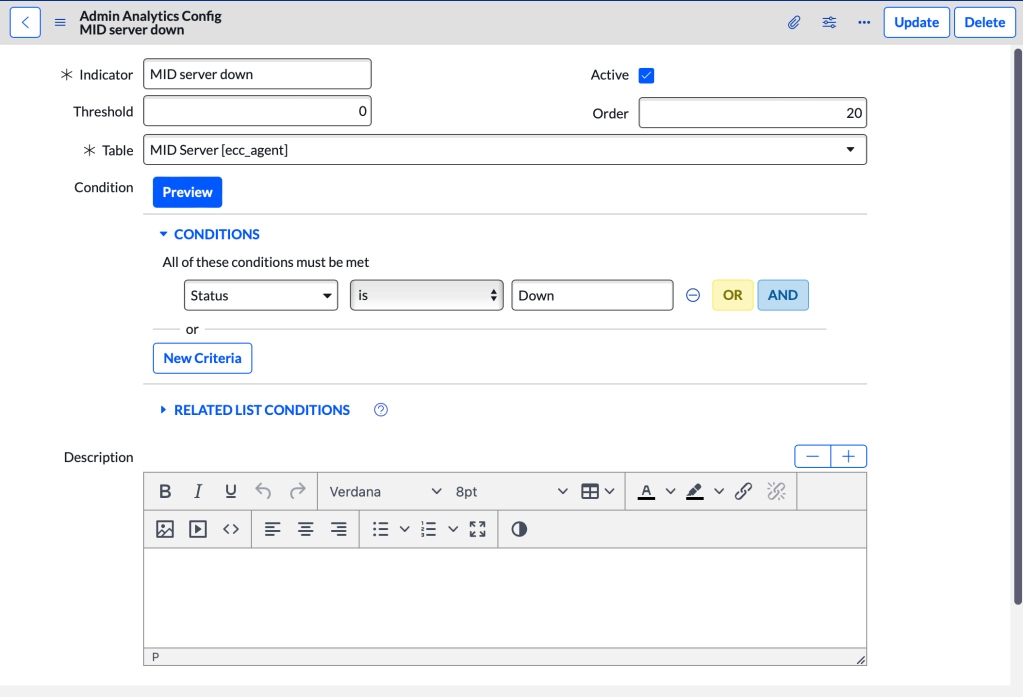
Config Table:
Name: Admin Analytics Config
Fields:
Indicator: Name, as you want it to appear on the scorecard.
Threshold: Threshold for the score.
Active: Active shows on the scorecard, inactive does not.
Order: Order to display on the scorecard.
Table: Table to report on.
Condition: Filter condition/query.
Description: HTML field for additional information you want to include.
Scorecard table:
I chose to go with a remote table to display the results.
Name: Admin Analytics Scorecards
Fields:
Indicator: Reference to the config record.
Score: GlideAggregate count of the query defined in the config.
Threshold: Threshold set in the config.
Link: Link to view the results.
Download it here.
 mySNstuff.com